> For the complete documentation index, see [llms.txt](https://helpcenter.verifone.com/llms.txt). Markdown versions of documentation pages are available by appending `.md` to page URLs; this page is available as [Markdown](https://helpcenter.verifone.com/t650-connections/bluetooth-setup.md).
# Bluetooth Setup
Follow the steps below to pair your terminal to a bluetooth network:
{% stepper %}
{% step %}
#### Check the Setup
Make sure all **cables are securely connected** to the base.\
Place the terminal **firmly on the base**.
{% endstep %}
{% step %}
#### Open the Launcher
Swipe down from the **top of the screen** to open the menu.\
Tap the **Launcher icon** (a grid of nine squares).
{% endstep %}
{% step %}
#### Open Base Control
Select the **Base Control** application.
{% endstep %}
{% step %}
#### Enable Bluetooth on the Base
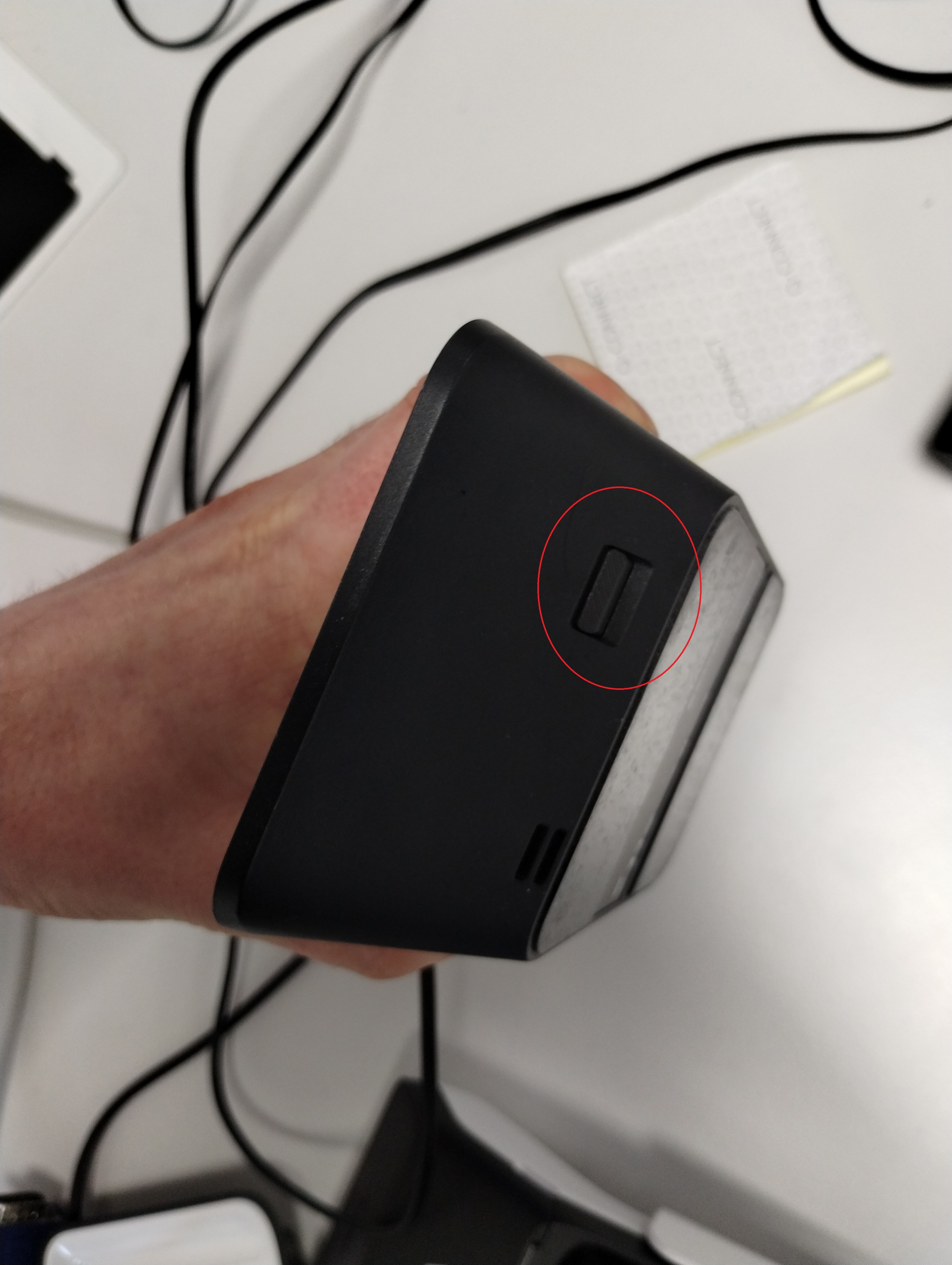
Press the **Bluetooth button** on the base (circled in red in the reference image).\
This button may feel slightly firm — press it until you hear a **click**.\
When activated, the **Bluetooth indicator light** on the side of the base will begin flashing.
{% endstep %}
{% step %}
#### Pair the Terminal
On the terminal, select **“Pair a New Dock.”**\
The terminal should then successfully pair with the base.
{% endstep %}
{% step %}
#### After Pairing
Once paired, the terminal will remain connected to the base **even when removed from it**, as long as Bluetooth stays within range.
{% endstep %}
{% endstepper %}
#### [Back to T650P - Connection Guide](#back-to-t650p-connection-guide)
---
# Agent Instructions
This documentation is published with GitBook. GitBook is the documentation platform designed so that both humans and AI agents can read, navigate, and reason over technical content effectively. Learn more at gitbook.com.
## Querying This Documentation
If you need additional information that is not directly available in this page, you can query the documentation dynamically by asking a question.
Perform an HTTP GET request on the current page URL with the `ask` query parameter, and the optional `goal` query parameter:
```
GET https://helpcenter.verifone.com/t650-connections/bluetooth-setup.md?ask=&goal=
```
`ask` is the immediate question: it should be specific, self-contained, and written in natural language.
`goal` is optional and describes the broader end goal you are ultimately trying to accomplish on behalf of the user. GitBook uses it to tailor the answer towards what is most useful for that goal.
The response will contain a direct answer to the question and relevant excerpts and sources from the documentation.
Use this mechanism when the answer is not explicitly present in the current page, you need clarification or additional context, or you want to retrieve related documentation sections.